
Best Settings
★ FF Resonance is Out Now!
☆ Best Visions for Each Character
★ Tier List | Early Game Builds | Best Skills
☆ All Dialogue Choices and Answers
★ Find all Chests, Tablet Shards, and Magicites
☆ Farming Guides for EXP and MRP
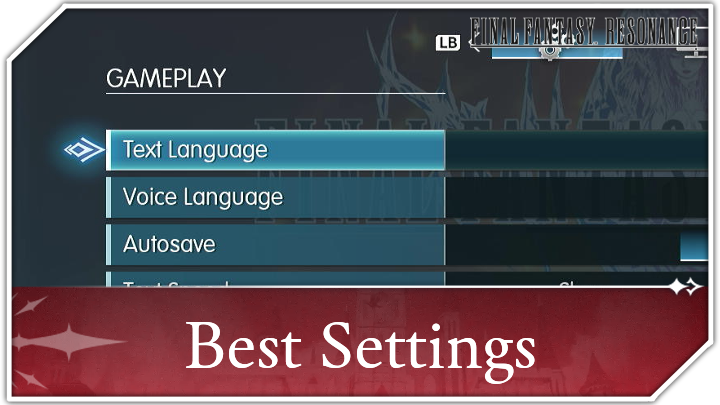
Here are the best settings for Final Fantasy Resonance (FF Resonance). Check all the recommended and optimal settings for the game in this guide.
List of Contents
 Attention, kupo! Attention, kupo! |
This page is still being updated! |
|---|
 under the page's title to be notified of any updates!
Best Settings to Change
Settings to Change First
| Text Speed | Instant |
|---|---|
| Sprint Type | Invert Sprint |
| Battle Speed | 3x Speed |
By default, the game sets its Text Speed to Normal and the Sprint Type to Hold. If you prefer the text to display at a faster speed, you can set it to Fast or Instant.
Change the Sprint Type to Invert Sprint so that Rain sprints by default without requiring to hold or press a button to do so.
Change Battle Speed During an Enemy Encounter
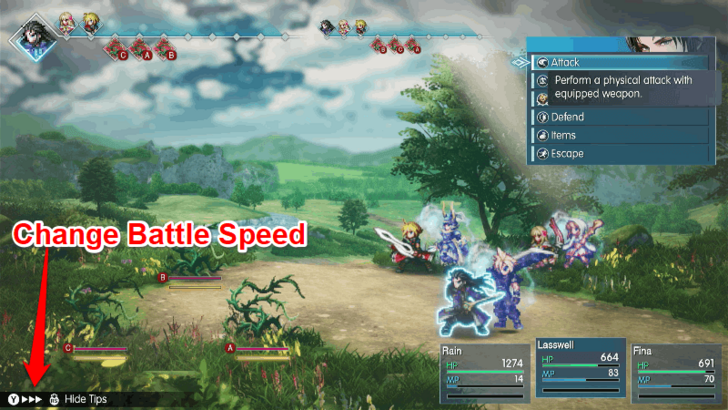
In the console versions, you can only change the Battle Speed when you are in an enemy encounter. Press the battle speed button at the lower-left corner and set it to the maximum setting to speed up the battle animations.
List of Settings
Gameplay Settings
| Setting | Description |
|---|---|
| Text Language | Changes the language used for in-game text. |
| Voice Language | Changes the language spoken by characters during voiced scenes. |
| Autosave | Toggles whether the game automatically saves your progress periodically. |
| Text Speed | Changes how quickly dialogue appears during cutscenes and conversations. |
| Command Cursor Position | Determines whether the battle command cursor remembers its previous position or resets when you close the command window. |
| Airship Horizontal Camera | Changes whether the airship's horizontal camera controls use normal or inverted inputs. |
| Additional Landing Marker | Toggles an additional marker for areas where the airship cannot land. |
| Sprint Type | Changes how you activate sprinting. |
| Display Encounter Sensor | Toggles the sonar-like radar on the minimap that indicates how close you are to triggering a random encounter. |
| Camera Sensitivity | Adjusts the sensitivity of the airship's camera controls. |
| Switch Confirm Button | Changes the Confirm and Cancel button layout. This setting is exclusive to console versions. |
Final Fantasy Resonance supports eight text languages and two voice languages: Japanese and English. We recommend setting Text Speed to Instant and Autosave to On for convenience.
You can also change Sprint Type to Invert Sprint to make Rain sprint by default, while the remaining settings let you customize your battle controls, camera, and exploration experience.
Display Settings
| Setting | Description |
|---|---|
| Brightness | Adjusts how light or dark the game appears on your display. |
Brightness is the only display setting available in the console versions of the game. It is set to 5 by default, but you can adjust it to suit your monitor and personal preference.
Audio Settings
| Setting | Description |
|---|---|
| Master | Adjusts the overall game volume. |
| Music | Adjusts the background music volume. |
| SFX | Adjusts the sound effects volume. |
| Voice | Adjusts the character voice volume. |
| Ambience | Adjusts the environmental sound volume. |
All audio settings are set to 10 by default. Adjust the Master, Music, SFX, Voice, and Ambience levels individually to balance the game's overall volume, soundtrack, sound effects, character dialogue, and environmental sounds to your liking.
Final Fantasy Resonance Related Guides

Beginner's Guide to Final Fantasy Resonance
All Tips and Tricks Guides
Comment



Author

Rankings
- We could not find the message board you were looking for.
Gaming News

![Final Fantasy Resonance Review [First Impressions] | Freed From Gacha, a Mobile Final Fantasy Becomes a Classic](https://img.game8.co/4658800/30a5fd716de9c6896b440b4c4b45de99.jpeg/show)
![Final Fantasy Resonance Review [First Impressions] | Freed From Gacha, a Mobile Final Fantasy Becomes a Classic](https://img.game8.co/4658800/30a5fd716de9c6896b440b4c4b45de99.jpeg/thumb)
![Stupid Never Dies Review [First Impressions] | Surprisingly Shallow Gameplay for a Roguelite That Has So Much Style](https://img.game8.co/4659636/e6eb3795e66fb88ce885b33e2c68e7ed.png/thumb)
![[INTERVIEW] STEINS;GATE RE:BOOT Devs Tease “We’re Pouring Our Hearts" Into the Series' Next Game](https://img.game8.co/4640596/54e1772041fc7f2b0cab415709a1ff16.jpeg/thumb)

Popular Games

Genshin Impact Walkthrough & Guides Wiki
Fire Emblem: Fortune's Weave (FEFW) Walkthrough & Guides Wiki
Aniimo Walkthrough & Guides Wiki
Wuthering Waves Walkthrough & Guides Wiki
Dragon's Dogma 2 (DD2) Dark Arisen Walkthrough & Guides Wiki
Umamusume: Pretty Derby Walkthrough & Guides Wiki
Honkai: Star Rail Walkthrough & Guides Wiki
Zenless Zone Zero Walkthrough & Guides Wiki
Pokemon TCG Pocket (PTCGP) Strategies & Guides Wiki
AION 2 Walkthrough & Guides Wiki









Recommended Games
Fire Emblem Heroes (FEH) Walkthrough & Guides Wiki
Where Winds Meet Walkthrough & Guides Wiki
Diablo 4: Lord of Hatred Walkthrough & Guides Wiki
Super Smash Bros. Ultimate Walkthrough & Guides Wiki
Persona 3 Reload Walkthrough & Guides Wiki
The Legend of Zelda: Tears of the Kingdom Walkthrough & Guides Wiki
Elden Ring Walkthrough & Guides Wiki
Pokemon Brilliant Diamond and Shining Pearl (BDSP) Walkthrough & Guides Wiki
Cyberpunk 2077: Ultimate Edition Walkthrough & Guides Wiki
Monster Hunter World Walkthrough & Guides Wiki








All rights reserved
© SQUARE ENIX
LOGO ILLUSTRATION: © YOSHITAKA AMANO
The copyrights of videos of games used in our content and other intellectual property rights belong to the provider of the game.
The contents we provide on this site were created personally by members of the Game8 editorial department.
We refuse the right to reuse or repost content taken without our permission such as data or images to other sites.