
Pokemon HOME Connectivity: How to Transfer and Release Date
★ Ranked Battle Season 15: Aug 06~Aug 27!
☆ Mystery Gift: Portal for Mega Garchomp Z!
★ Complete all 3 Dexes to get a Shiny Volcanion!
☆ See the Returning Pokemon & New DLC Megas.
★ Interactive Map: Screws, TMs, Mint Shops
☆ Find your desired Pokemon at the Trading Board.
You can transfer Pokemon from previous games to Pokemon Legends: Z-A through Pokemon HOME starting April 2, 2026. Learn the release date for HOME Connectivity, how to transfer, what Pokemon you are and aren't able to transfer, and what games you can transfer Pokemon to!
List of Contents
HOME Connectivity Release Date and Countdown
HOME Connectivity is Live!
| Pokemon HOME Connectivity Countdown |
|---|
|
Maintenance is now Over! (Log-in Times Are staggered, please wait for a while) |
Maintenance for Pokemon HOME connectivity has been announced! Starting April 02 at 00:00 AM, Pokemon HOME will go under maintenance to allow transfer for Pokemon Legends: Z-A and the upcoming Pokemon Champions!
How to Transfer Pokemon From Pokemon Home
How to Transfer Pokemon to Pokemon Legends: Z-A
| # | Steps |
|---|---|
| 1 | 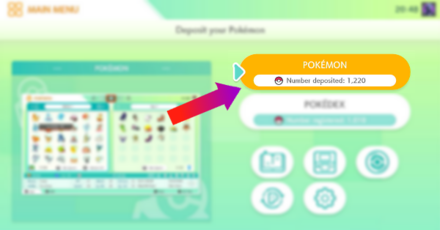 Open the Pokemon HOME App and select the button that says "Pokemon". |
| 2 | Select Pokemon Legends: Z-A from the games list. |
| 3 | The left side will display your the Pokemon available in your Pokemon HOME. Meanwhile, the right displays your storage boxes in Pokemon Legends: Z-A. |
| 4 | Drag a Pokemon from the left side to the right to transfer it to the game. Keep in mind that once you transfer Pokemon to Pokemon Legends: Z-A, you will no longer be able to transfer it to a different game. |
| 5 | Return to the main screen in order to save the changes you made. |
| 6 | 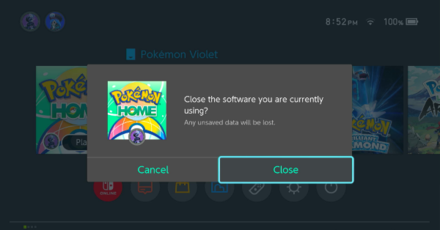 Close the Pokemon HOME App and open Pokemon Legends: Z-A. |
| 7 | You can check the Pokemon you moved into the game by checking your storage box in-game. |
| 8 | You have now successfully transferred your Pokemon into Pokemon Legends Z-A! |
Pokemon From Legends: Z-A Cannot Be Transferred to Previous Games
You will be unable to transfer Pokemon from Pokemon Legends Z-A into previous titles even if they are availble in older regions.
Why Can't I Transfer Certain Pokemon?
Some Pokemon Are Not Available in Pokemon Legends: Z-A
 Lumiose Pokedex Lumiose Pokedex |
 Hyperspace Pokedex Hyperspace Pokedex |
Not all Pokemon are transferrable to Pokemon Legend: Z-A. Only those that are featured in PLZA's Lumiose Pokedex and Hyperspace Pokedex can be brought into the game.
How to Get Pokemon HOME
Download From Nintendo eShop
| # | How to Download Pokemon HOME on Nintendo Switch |
|---|---|
| 1 | 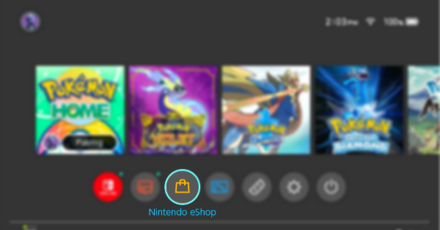 Open the Nintendo Switch eShop App from the Homescreen. |
| 2 | 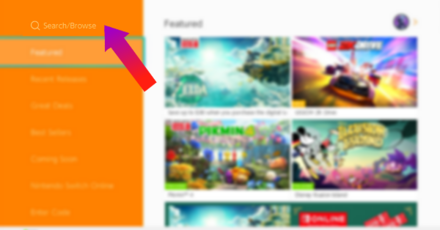 After you log in, click the Search/Browse option in the top left corner of the screen. |
| 3 | 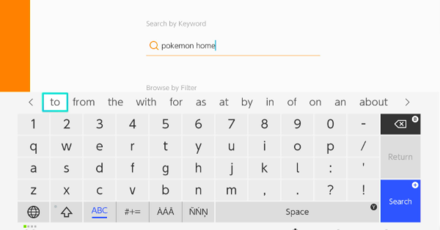 Using the Search bar, type in Pokemon HOME to immediately find the application in the shop. |
| 4 | 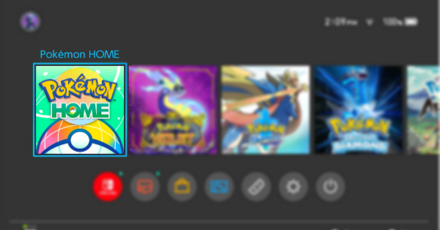 Click install and wait for the application to install on your Nintendo Switch system. |
| 5 |  Once it finishes downloading, open the app and login using your Nintendo Account. NOTE: You need to have a Pokemon HOME subscription in order to access all of the features of Pokemon HOME. |
Pokemon Legends: Z-A Related Guides
Beginner's Guide to Pokemon Z-A
Gameplay Features
How-To Guides
Farming Guides
| Farming Guides | |
|---|---|
| EXP Farming Guide: How to Level Up Fast | How to Farm Money Fast |
| How to Get Prize Medals | How to Get Ticket Points Fast |
| How to Get More Berries | - |
Comment



Author

Pokemon HOME Connectivity: How to Transfer and Release Date

Rankings
- We could not find the message board you were looking for.

Gaming News


![Stupid Never Dies Review [First Impressions] | Surprisingly Shallow Gameplay for a Roguelite That Has So Much Style](https://img.game8.co/4659636/e6eb3795e66fb88ce885b33e2c68e7ed.png/thumb)
![Final Fantasy Resonance Review [First Impressions] | Freed From Gacha, a Mobile Final Fantasy Becomes a Classic](https://img.game8.co/4658800/30a5fd716de9c6896b440b4c4b45de99.jpeg/thumb)
![[INTERVIEW] STEINS;GATE RE:BOOT Devs Tease “We’re Pouring Our Hearts" Into the Series' Next Game](https://img.game8.co/4640596/54e1772041fc7f2b0cab415709a1ff16.jpeg/thumb)
Popular Games

Genshin Impact Walkthrough & Guides Wiki
Fire Emblem: Fortune's Weave (FEFW) Walkthrough & Guides Wiki
Aniimo Walkthrough & Guides Wiki
Wuthering Waves Walkthrough & Guides Wiki
Dragon's Dogma 2 (DD2) Dark Arisen Walkthrough & Guides Wiki
Umamusume: Pretty Derby Walkthrough & Guides Wiki
Honkai: Star Rail Walkthrough & Guides Wiki
Zenless Zone Zero Walkthrough & Guides Wiki
Pokemon TCG Pocket (PTCGP) Strategies & Guides Wiki
AION 2 Walkthrough & Guides Wiki










Recommended Games
Fire Emblem Heroes (FEH) Walkthrough & Guides Wiki
Where Winds Meet Walkthrough & Guides Wiki
Diablo 4: Lord of Hatred Walkthrough & Guides Wiki
Super Smash Bros. Ultimate Walkthrough & Guides Wiki
Persona 3 Reload Walkthrough & Guides Wiki
The Legend of Zelda: Tears of the Kingdom Walkthrough & Guides Wiki
Elden Ring Walkthrough & Guides Wiki
Pokemon Brilliant Diamond and Shining Pearl (BDSP) Walkthrough & Guides Wiki
Cyberpunk 2077: Ultimate Edition Walkthrough & Guides Wiki
Monster Hunter World Walkthrough & Guides Wiki








All rights reserved
©2025 Pokémon. ©1995-2019 Nintendo/Creatures Inc. /GAME FREAK inc.
The copyrights of videos of games used in our content and other intellectual property rights belong to the provider of the game.
The contents we provide on this site were created personally by members of the Game8 editorial department.
We refuse the right to reuse or repost content taken without our permission such as data or images to other sites.